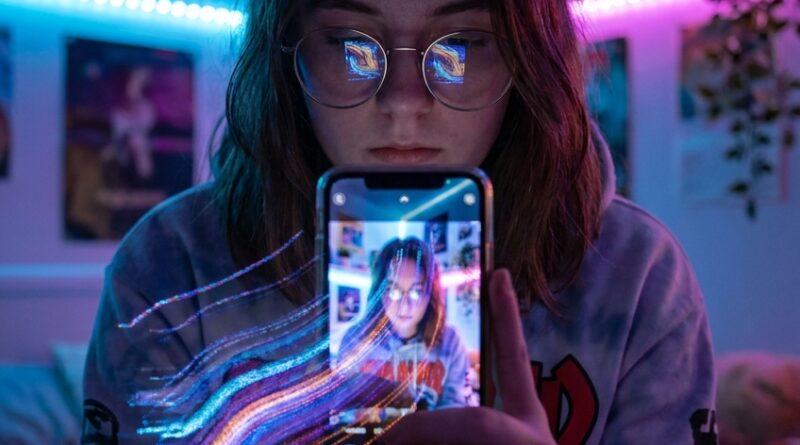
Inside TikTok’s ‘Pixel Stretch’ Comeback: How A 2008 Photo Trick Just Became Gen Z’s Favorite Reality Warp
Your feed probably feels weirdly identical right now. Same muted outfits. Same get-ready-with-me pacing. Same recycled templates with slightly different songs. If you make content, that gets old fast. Worse, it makes your own posts feel invisible before anyone even watches them. That is exactly why the TikTok pixel stretch trend is taking off again. It looks different at a glance, it feels a little chaotic, and it gives even a simple photo or clip that “wait, what was that?” quality people actually stop for. The funny part is this is not some brand-new AI trick. Pixel stretch comes from an older digital art style that artists were playing with back in the late 2000s. TikTok just gave it a new job. Instead of living in galleries or Tumblr-era experiments, it is now being used to bend selfies, fashion shots, landscapes, and story slides into something that feels handmade, strange, and very scroll-stopping.
⚡ In a Hurry? Key Takeaways
- The TikTok pixel stretch trend is a retro image effect that pulls colors and lines from part of a photo to create warped, painterly motion.
- You can start with one strong photo, one stretch point, and a simple reveal instead of over-editing the whole frame.
- It is cheap, easy, and beginner-friendly, but it works best when the distortion supports your idea instead of hiding a weak post.
What Pixel Stretch Actually Is
Pixel stretching is exactly what it sounds like. You take a thin slice of an image, often one row or column of pixels, and drag it across the frame. That creates long streaks of color, texture, and shape. Hair becomes ribbons. City lights turn into neon rain. A beige sweater can suddenly look like liquid fabric.
Back in the late 2000s, digital artists used it as a glitch-adjacent style. It fit that era’s love of broken-looking tech, webcam aesthetics, and experimental photo editing. Now it is back because TikTok loves anything that feels both retro and fresh.
And unlike some trends, this one does not demand expensive gear, a perfect face beat, or a full editing workstation. A phone, a photo app, and a decent eye for composition can get you there.
Why the TikTok Pixel Stretch Trend Is Suddenly Everywhere
It breaks the “samey” problem
Most short-form feeds are suffering from visual déjà vu. That is not because creators are lazy. It is because platform trends reward imitation. Once a certain edit style works, everyone copies it. Pixel stretch cuts through that because even a basic version looks less polished in a good way. It feels more custom.
It hits the nostalgia button
Gen Z and younger millennials love rediscovering old internet aesthetics. Film grain, digicam flash, messy typography, MySpace energy, all of it is back in rotation. Pixel stretch slides neatly into that mix. It feels like a relic from an internet that was stranger and more playful.
It flatters imperfect content
Some trends only work if you already have a beautiful setup. Pixel stretch is more forgiving. Bad wall in the background? Stretch it into an abstract wash. Outfit photo feels flat? Pull color from one side and turn it into motion. It can make simple source material feel intentional.
Who Is Owning It First
Not every corner of TikTok is using this the same way. A few niches are getting to it faster.
Fashion creators
This is probably the easiest fit. Pixel stretch turns fabric, silhouettes, and accessories into dramatic shapes. If someone is posting outfit transitions or mood-board style lookbooks, the effect makes even neutral clothing feel less boring.
Beauty and GRWM creators
Instead of another standard mirror clip, beauty creators are using pixel stretch for intro cards, shade reveals, and post-makeup stills. A stretched swipe from lipstick or eyeliner color gives the frame movement without filming a full cinematic sequence.
Music and mood-edit accounts
These creators already understand pacing and atmosphere. Pixel stretch works well with ambient sounds, dreamy vocals, and slideshow edits where the image itself needs to carry emotion.
Travel and landscape pages
Sunsets, roads, oceans, skylines, and tree lines all stretch beautifully. If you have ever taken a scenic photo that still somehow looked dull online, this is one of the easiest ways to make it feel more alive.
How to Use Pixel Stretch Without Making It Look Like a Gimmick
The biggest mistake is treating the effect like the whole idea. It is not. It is the packaging.
Start with one image that already has a strong color story
The best source photos have clear contrast or distinct blocks of color. Think bright sky behind a dark subject. A colorful outfit against a plain wall. A close-up beauty shot with one bold accent. If the image is muddy to begin with, the stretch usually just makes it muddier.
Choose one direction
Horizontal stretches feel calm and cinematic. Vertical stretches often feel more dramatic and surreal. Diagonal or mixed directions can work, but they get messy fast. If you are new to the TikTok pixel stretch trend, keep it simple.
Use the stretch to guide the eye
Good edits tell people where to look. Pull the stretch away from the subject, not across their face unless you want a deliberately distorted effect. A fashion creator might stretch outward from a sleeve. A travel page might pull the sunset color across empty sky. That feels designed, not random.
Leave some of the original image untouched
This is what separates “cool effect” from “I accidentally broke my photo.” If the whole image is stretched beyond recognition, viewers lose the anchor point. Keep enough of the original shot visible so the distortion feels surprising.
Easy Post Ideas You Can Try Tonight
1. The outfit reveal
Take a full-body mirror shot. Stretch one side of the outfit outward to create a color trail. Pair it with text like “I was tired of dressing safe.” It works especially well with denim, metallics, stripes, or chunky knitwear.
2. The before-and-after beauty slide
Use a clean before shot, then a finished look. Add a pixel stretch transition between the two using a color from the makeup. It is quicker than filming a full transformation reel and still feels thought-out.
3. The mood-board carousel
For stories or slideshow posts, alternate normal images with stretched versions. This gives the set rhythm. It also helps basic screenshots or reference images feel more cohesive.
4. The quote card with motion
If you post thoughts, lyrics, or mini-journaling content, put the text over a stretched image background made from your own photo. It looks more personal than a stock gradient.
5. The travel memory reset
Open old vacation photos. Pick one with a strong horizon or bright light source. Stretch the edge colors and add a short caption. Suddenly that forgotten camera roll image looks current.
Apps and Tools People Are Using
You do not need pro software for this. Most creators are getting the look through mobile editing apps, CapCut workarounds, photo effect apps, or desktop tools if they want more control.
Beginner-friendly options
Look for apps that include stretch, smear, liquify, glitch, or scanline-style tools. Some do true pixel stretch. Others fake the feel well enough for TikTok. If you already use CapCut, search templates carefully, but do not rely on them too much. The whole point is to escape the “same template as everyone else” trap.
More advanced options
If you use Photoshop or Procreate, you get much better control over exactly which section of the image is being stretched and how far. That said, this trend does not need perfection. Quick and expressive often performs better than overworked.
Why This Old Trick Fits TikTok So Well
TikTok rewards the pause. Not always the prettiest image. Not always the most expensive setup. The pause. Pixel stretch creates just enough visual confusion to earn that extra half-second of attention. People see a face, outfit, or landscape, then notice the warped tail of color and look again.
That second look matters. It can be the difference between a swipe and a view. In a crowded feed, weird can be useful.
There is also a bigger cycle at work. Every platform eventually gets bored with its own polish. When everything looks optimized, people start craving texture. Mess. Play. The TikTok pixel stretch trend lands right in that moment.
What to Avoid
Do not stretch everything
If every photo in a carousel gets the same aggressive treatment, people stop noticing it. Use it as seasoning, not the whole meal.
Do not use low-quality source images if you can help it
Some blur is fine. Heavy compression is not. Stretching already crushed pixels usually looks accidental rather than artistic.
Do not copy the first viral example you saw
This trend is still early enough that originality matters. If your version looks exactly like everyone else’s, you are back where you started.
Do not hide weak ideas behind effects
The effect can help a strong concept stand out. It cannot rescue boring captions, confusing framing, or posts with no point of view.
At a Glance: Comparison
| Feature/Aspect | Details | Verdict |
|---|---|---|
| Ease of use | Basic versions can be made in mobile apps with one photo and a few taps. | Great for beginners |
| Visual impact | Creates an instant scroll-stopping look by adding warped color and motion to still images. | High impact when used sparingly |
| Trend lifespan | It is viral now, but still new enough that most creators have not pushed it past the obvious uses. | Worth trying now, before it gets overdone |
Conclusion
If your posts have been disappearing into a sea of beige sameness, this is one of those rare trends that can actually help. Pixel Stretch sits in a sweet spot. People recognize it from the viral wave, but most still have not figured out how to do more with it than basic distortion. That gives you room. With one decent photo, a simple edit, and a little intention, you can make something that feels more personal and more noticeable tonight. No fancy camera. No advanced editing degree. Just a clever old trick, repurposed for a feed that badly needs a little weirdness.